Most first-time importers hit a wall here. The form itself is only three pages, but between EIN verification, NAICS codes, bank details, and figuring out whether you need to file "new," "update," or "reactivate," it's easy to submit something CBP bounces back.
This isn't a rare filing, either. CBP's own 2024 estimate puts annual respondents at 432,000, based on a Federal Register notice covering the form's Paperwork Reduction Act renewal. That's not a count of completed filings, but it signals how routine this requirement is across the trade community.
This guide covers when to file, what to gather beforehand, and how to complete Form 5106 without triggering a rejection cycle.
Key Takeaways
- File Form 5106 once, before your first entry, to register your Importer of Record identity with CBP.
- You'll need an EIN, SSN, or CBP-assigned number that matches IRS or SSA records.
- Submit electronically via ACE, or manually by emailing the correct Center of Excellence and Expertise.
- Numbers go dormant after one year of inactivity under 19 CFR 24.5(e), forcing a fresh filing.
- EIN mismatches and missing signatures cause most rejections.
When Should You File CBP Form 5106?
Form 5106 isn't a per-shipment form. Under 19 CFR 24.5(a), it's tied to your first formal entry or your first request for a service that generates a bill or refund. Once your identity is on file, subsequent shipments don't require refiling, only updates when your details change.
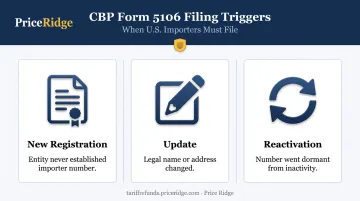
Three scenarios trigger a filing:
- New registration - your entity has never established an importer number with CBP.
- Update - your legal name or address changed, and CBP needs current records on file.
- Reactivation - your number went dormant from inactivity and needs to be reinstated before you can use it again.
Timing matters most before cargo arrives. File after your shipment lands, and you're looking at entry holds, accumulating storage fees, and a release that won't happen until CBP processes the record.
DDP Shipments and Who Files
Under Delivered Duty Paid terms, the foreign seller handles clearance, duties, and formalities at the destination. A 2021 CBP ruling confirms this cost-and-risk arrangement. However, DDP terms alone don't automatically make the foreign seller the Importer of Record. That status depends on who's actually functioning as IOR for the entry.
When the foreign seller does act as Importer of Record, that entity needs its own importer identity on file, either by filing Form 5106 directly or arranging for a U.S. agent or broker to do it. Skipping this step is a common reason DDP shipments stall at the border.
Why This Matters for Refund Claims
Form 5106 doesn't just govern entry and release. CBP's identity record also underpins liquidation and the issuance of bills and refunds. If you're pursuing a duty refund and your importer profile is inactive, mismatched, or outdated, CBP has nowhere to send the money.
For importers pursuing IEEPA tariff refund claims, this connection is critical. Price Ridge manages the CAPE Declaration and claim process for these refunds, but that process only moves forward once an importer's CBP identity records are confirmed accurate.
A name mismatch or lapsed status on your Form 5106 profile can hold up a refund that's otherwise ready to disburse.
The filing requirement doesn't shift based on transport mode either. Air, ocean, rail, or truck: it's tied to the responsible party, not the shipment itself.
What You Need Before Filing CBP Form 5106
Gathering the right documentation before you start prevents the back-and-forth that eats up processing time. CBP's system flags mismatches automatically, which means preparation matters more here than in most customs paperwork.
Identification number:
- EIN or SSN that matches IRS or SSA records exactly (a single-digit typo triggers automatic rejection)
- If neither applies, request a CBP-assigned number instead
Legal business or personal information:
- Legal name, physical address, and mailing address exactly as registered with tax authorities
- Current phone number and email
Filing type:
- Confirm whether you're filing new, updating, or reactivating
- If reactivating, locate your prior importer number before you start
Bond information (if applicable):
- Continuous bond number and surety company details for regular importers
- Occasional importers typically arrange single-entry bonds through their broker rather than listing them on this form
Point of contact and authorized signer:
- Someone who can answer CBP's follow-up questions
- Confirmation of who's authorized to certify the form
- Signature by someone without that authority is a frequent rejection reason
How to File CBP Form 5106 (Step-by-Step)
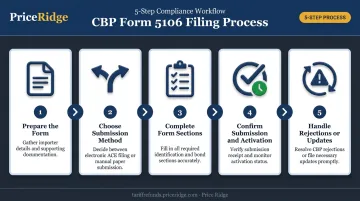
Filing correctly follows a defined sequence: preparation, choosing a submission method, completing each section, and confirming activation. Rushing any one of these steps is the top cause of processing delays.
Preparing the Form
Download the current version directly from cbp.gov rather than reusing an old PDF. The current revision is 06/26, expiring 06/30/2027, and it's available on CBP's official forms page. CBP periodically revises the form and integrates changes into ACE, so outdated versions can contain fields that no longer match current requirements.
A common setup error: copying business information from an old filing without checking it against current IRS records. If your business moved, changed its legal name, or updated its registered address since your last filing, that old data will cause a mismatch.
Choosing a Submission Method
You have two paths:
- Electronic filing via the ACE Secure Data Portal, either directly or through a licensed broker with ABI access
- Manual submission by email to the appropriate Center of Excellence and Expertise (CEE)
For manual filings, your subject line needs to read "New 5106 Add" or "5106 Update." If you're not sure which CEE covers your account, CBP's guidance says to pick the Center associated with your shipment's highest-value tariff line.
| CEE | Submission Email |
|---|---|
| Agriculture and Prepared Products | CEE-Agriculture@cbp.dhs.gov |
| Apparel, Footwear and Textiles | CEE-Apparel@cbp.dhs.gov |
| Automotive and Aerospace | CEE-Automotive@cbp.dhs.gov |
| Electronics | CEE-Electronics@cbp.dhs.gov |
| Machinery | CEE-Machinery@cbp.dhs.gov |
(Full CEE directory available on CBP's Form 5106 FAQ page.)
Completing the Form Sections Correctly
Work through each section carefully:
- Importer identification - name, tax ID, and number type
- Business description and NAICS code - six digits, if known
- D-U-N-S number - if available
- Key individuals - officers or owners, required if requesting a CBP-assigned number
- Broker information - if a broker will be filing on your behalf
Names across every field should match your commercial invoice and bill of lading exactly. Small inconsistencies here are a leading cause of holds.
For the certification block, only the business owner or an authorized representative may sign. CBP accepts electronic signatures, but the signer's authority still needs to check out.
Confirming Submission and Activation
A successful filing gets you a CBP acknowledgment or an ACE status update. A bounce-back email or an entry hold notice signals something went wrong.
CBP's published benchmarks:
| Request Type | Typical Processing Time |
|---|---|
| New IOR registration and activation | 2 business days |
| Update to existing IOR profile | 5 business days |
These are typical timelines, not guarantees. Build in buffer time before your cargo is scheduled to arrive.
Handling Rejections or Required Updates
If CBP flags an error, correct it and resubmit, referencing your original submission where possible. This keeps your correction tied to the existing request rather than starting a new review from scratch.
Letting a profile lapse into inactivity forces a brand-new filing, not a simple update. For seasonal importers who go quiet for part of the year, this is an entirely avoidable delay if you track your filing status proactively.
Common Filing Errors and Best Practices
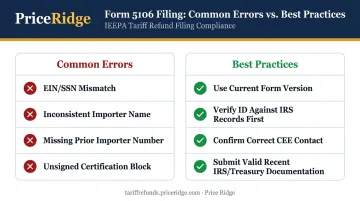
CBP hasn't published a ranked list of "most common" mistakes, but its documented validation rules point clearly to where filings go wrong.
Frequent errors:
- EIN or SSN that doesn't match IRS/SSA records exactly
- Importer name inconsistent with shipping documents
- Missing reference to a prior importer number when reactivating
- Unsigned or improperly signed certification blocks
Best practices:
- Always use the current form version from cbp.gov
- Verify your identification number against IRS records before submitting, not after
- Confirm the correct CEE before sending a manual filing
- For unvoid requests, CBP requires official IRS/Treasury documentation received within the prior 12 months
- W-9s, SS-4s, and state documents don't satisfy this documentation requirement
For first-time or infrequent importers, working with a licensed customs broker or service provider who catches these issues before submission saves real time. A broker who's filed hundreds of these forms will spot a name mismatch or missing signature before CBP ever sees it.
Conclusion
Filing Form 5106 correctly comes down to accuracy, timing, and picking the right submission path, not complexity. Treat your importer identity as an active compliance asset. Once it's on file, it needs to stay current or you risk clearance delays and forfeit eligibility for adjustments like duty refunds.
If you've paid IEEPA tariffs and are exploring recovery, Price Ridge manages the CAPE Declaration and claim process end-to-end, once your importer records are confirmed accurate. It starts with a free, no-obligation eligibility review, and Price Ridge typically responds to new inquiries within one business day.
Frequently Asked Questions
What is a Create/Update Importer Identity Form?
CBP Form 5106 registers or updates an entity's Importer of Record profile within CBP's ACE system under 19 CFR 24.5. It establishes the identity CBP associates with your import activity.
Why does CBP Form 5106 matter for my import transactions?
This record underpins bond coverage, release and entry of merchandise, liquidation, and the issuance of bills and refunds tied to your importer number. Without it, none of these functions can proceed.
Do I need to submit CBP Form 5106 for every shipment?
No. You file it once initially, and the number stays valid as long as import activity continues at least annually. This isn't a recurring per-shipment requirement.
How long does it take CBP to process Form 5106?
New filings typically activate within 2 business days. Updates to existing profiles typically take around 5 business days. These are CBP's stated benchmarks, not guaranteed timelines.
What happens if my importer number goes inactive?
Under 19 CFR 24.5(e), CBP removes numbers from its files after one year without qualifying import activity. Reactivating requires a brand-new signed filing, even if nothing else about your business changed.
Who is responsible for filing Form 5106 in DDP shipments?
When the foreign seller actually acts as Importer of Record under DDP terms, that seller must file Form 5106 or arrange for a U.S. agent or licensed broker to file on its behalf. DDP terms alone don't automatically confer IOR status.